ChatGPT ads are the ads OpenAI shows below ChatGPT answers, labelled "Sponsored" and matched to the context of the conversation. To advertise, you open an account in your business's name in OpenAI Ads Manager at ads.openai.com, get the account verified and set up billing; then you create a campaign, an ad group and ads and submit them for review. Since September 2026, Turkey has been one of the countries where self-serve access is open.
In this guide we cover ChatGPT ads end to end: how they work, who sees them, step-by-step setup, targeting, ad copy, measurement, cost, how they differ from Google Ads, restricted industries and the most common mistakes. The information is compiled from OpenAI's official Help Center and announcements; sources are listed at the end.
What are ChatGPT ads?
ChatGPT ads are OpenAI's paid ad placement inside ChatGPT. When a user asks ChatGPT a question and the system finds an ad relevant to the topic and intent of the conversation, it shows it below the answer as a card separate from the answer. The card always carries a "Sponsored" label.
According to OpenAI, a ChatGPT ad is made up of six parts:
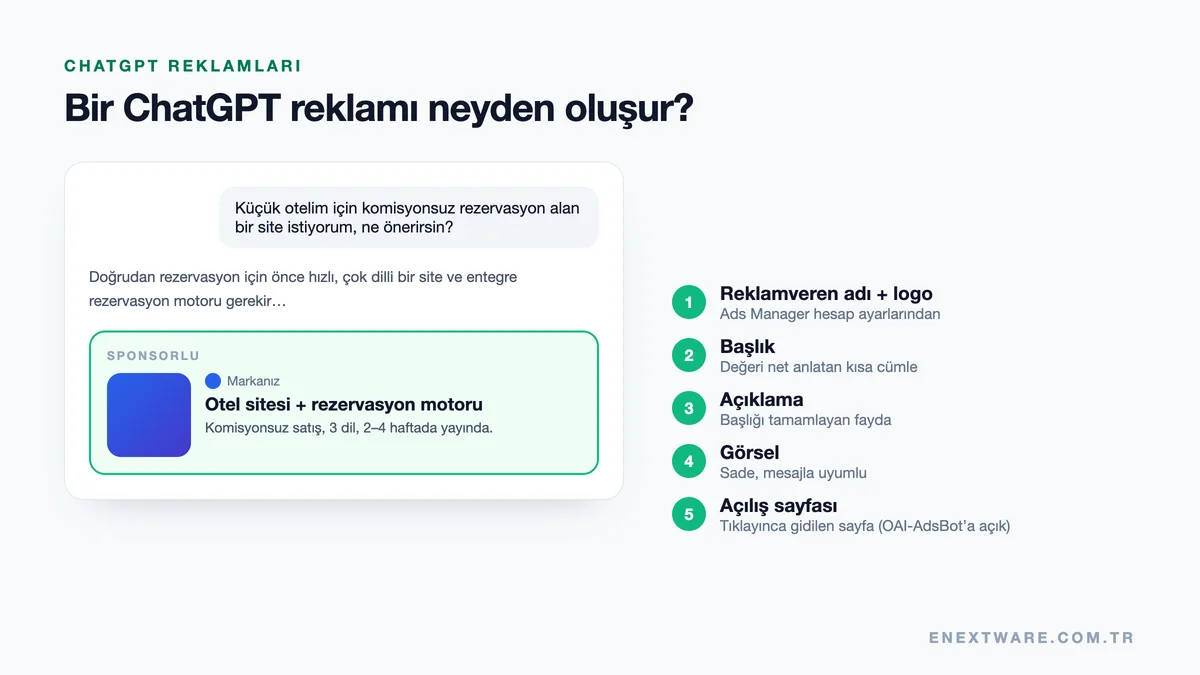
| Part | Description |
|---|---|
| Advertiser name | The account name in your Ads Manager account settings |
| Favicon / logo | Your brand logo |
| Headline | A short headline that states the value clearly |
| Description | Benefit-focused copy that complements the headline |
| Image | A clean image that matches the message |
| Landing page | The web page the user goes to after clicking |
Right now text and image ads are used; there is no video format. For brands with a product catalogue, product feed campaigns are also available as a separate campaign type.
Have ChatGPT ads launched in Turkey? Who sees them?
Yes. As of September 2026, Turkey is listed as "self-serve available" on OpenAI's Ads Manager availability list. This means a business established in Turkey can open an advertiser account at ads.openai.com without needing an intermediary. For self-serve use, the legal entity that advertises and is billed must be established in a country where access is open.
Who sees the ads is also governed by clear rules:
- Users on ChatGPT's Free and Go plans may see ads.
- Users on the Plus, Pro and Business plans are not shown ads.
- Users believed to be under 18, based on account information or age prediction, are not shown ads.
- Ads do not appear in conversations about sensitive topics or in contexts that are unsuitable from a brand-safety point of view.
Because free users make up ChatGPT's largest user group, these restrictions do not narrow reach dramatically. But remember that targeting is not aimed at "everyone"; it is aimed at conversations where the ad is relevant.
ChatGPT ads timeline
ChatGPT ads expanded quickly throughout 2026:
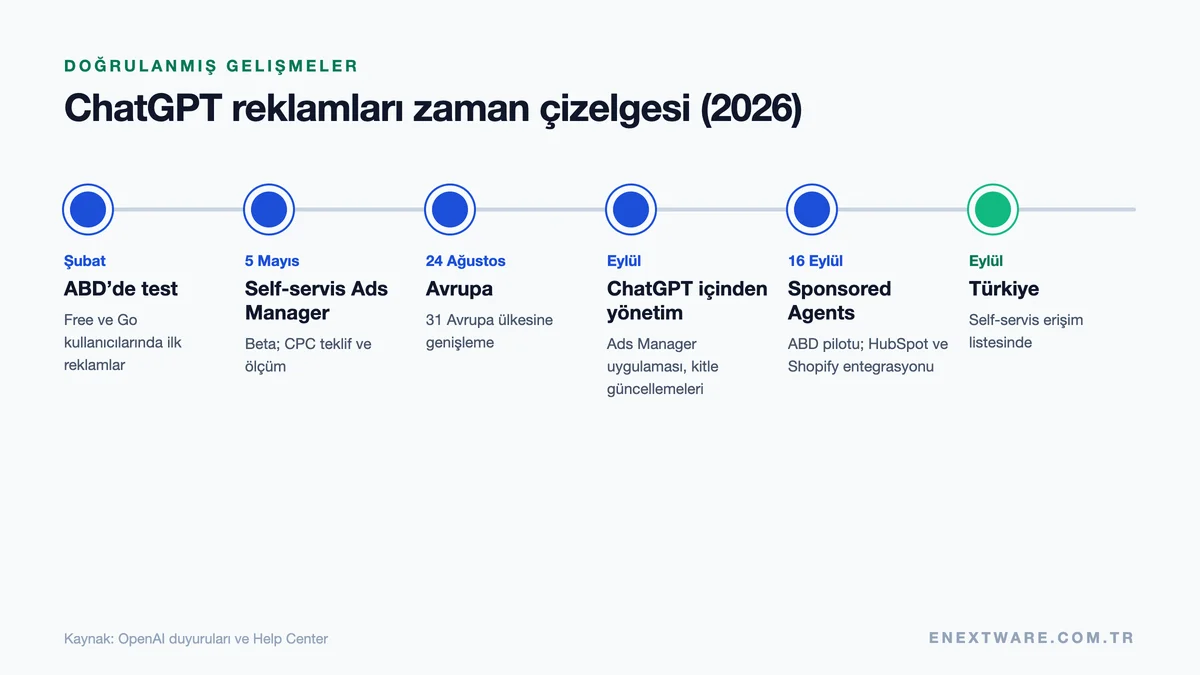
| Date | Development |
|---|---|
| February 2026 | Ad testing started for Free and Go users in the US |
| May 5, 2026 | Self-serve Ads Manager opened in beta; cost-per-click (CPC) bidding and measurement tools arrived |
| August 24, 2026 | Ads expanded to 31 European countries, including Germany, France, Italy and Spain |
| September 2026 | Ads Manager became usable from within ChatGPT; custom audience features expanded |
| September 16, 2026 | Sponsored Agents pilot (US) and HubSpot and Shopify integrations announced |
| September 2026 | Turkey added to the self-serve availability list |
How do ChatGPT ads work?
In Google Ads, your ad appears when the search query a user types matches the keywords you have chosen. ChatGPT works differently. When OpenAI's ad system selects an ad, it looks at several signals:
- Conversation context and intent: What the user is trying to do in the current conversation.
- The ad itself: The headline, description and the content of the landing page.
- Context hints: The advertiser's descriptions of the conversations in which their product would be useful.
- Personalisation signals: If the user has left ad personalisation on, certain selected signals from their ChatGPT experience.
The auction runs on a relevance-weighted second-price model. That means two things: the winning ad usually pays not its own maximum bid but the amount needed to beat the competitor; and a more relevant ad can win with a lower bid.
Context targeting: 3 example conversations
It is easier to see how context hints work with concrete examples:
Example 1: Decision stage. The user writes: "I have a 12-room boutique hotel and I want to take bookings on my own website to get away from Booking commissions. Where should I start?" This sentence gives the business type, scale, problem and goal all at once. An ad with the context hint "a website with a booking engine for small hotels that want to take direct bookings" would be a strong candidate here.
Example 2: Problem solving. "Lots of people add to cart on my e-commerce site, but they abandon at the checkout step. What can I do?" In this conversation, an ad from a brand offering checkout-flow optimisation, a one-page checkout system or conversion consulting is relevant.
Example 3: Comparison. "Which CRM suits a small accounting office better? My budget is limited." Here, a CRM ad aimed at SMEs that states its price and setup time clearly can stand out.
What the three examples have in common is that the user describes a situation, not a keyword. That is why the ads that succeed in ChatGPT are the ones that say clearly in which situation the product helps.
How do you advertise on ChatGPT? Step-by-step setup
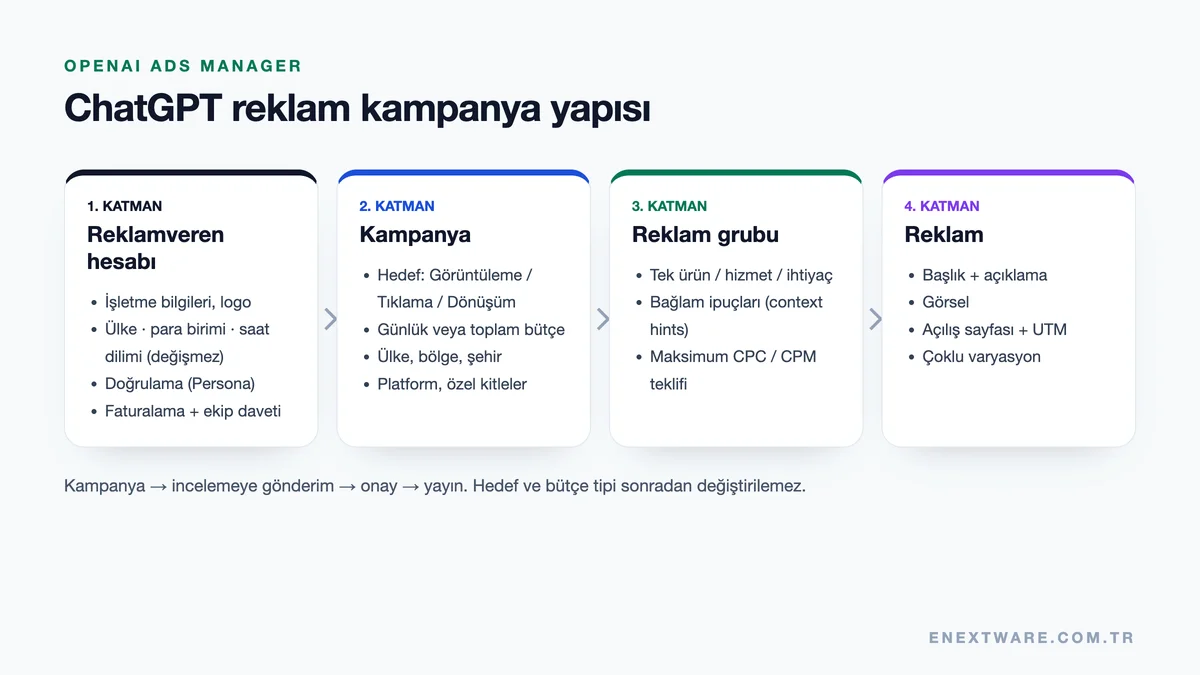
Every campaign in Ads Manager follows the same four-layer structure:
Step 1: Readiness check
Before opening an account, clarify four things. Does your industry comply with the ad policies? Is the company that will advertise established in Turkey? Is your landing page ready and open to OpenAI's crawler? Do your credit card and invoice details match the company?
Step 2: Open an Ads Manager account
Start the sign-up flow at ads.openai.com. You need an OpenAI account; if you don't have one, you can create it during sign-up. Use an account tied to your work email. Sign-up asks for your business name, website, logo, industry, account country, currency and time zone.
Important: Country, currency and time zone cannot be changed after the account is created. If you make a mistake, you have to open a new advertiser account. OpenAI asks that a single account owner opens the account for each business and that other team members are invited afterwards.
Step 3: Complete account verification
After the business details, a few verification questions are answered via Persona and the application goes into review. Because applications are reviewed in order, this step can take a few days. Don't submit a second application while the review is in progress; OpenAI states that duplicate applications do not speed up the process.
Step 4: Complete account details and billing
Once access is granted, check the account name and logo under Settings; they appear exactly as entered on the ad card, and ads will not run until this step is complete. Then add your billing profile (business name, billing email, address) and credit card. When you add the card, your bank may show a temporary authorisation hold; this is not a charge.
Step 5: Invite team members and your agency
Add teammates or your agency via Settings > Users > Invite. For agencies managing several brands, each advertiser should have its own account; the agency gets access by invitation to the account opened by the business.
Step 6: Create the campaign
Campaigns can be created with a guided step-by-step flow or by bulk upload from a template. The following decisions are made at campaign level:
- Objective: Views (CPM), Clicks (CPC) or Conversions. The objective cannot be changed later.
- Budget: A daily budget or a campaign lifetime budget. OpenAI recommends the daily budget for beginners.
- Dates: Start and end, according to seasons and campaign periods.
- Location: Country; where available, region, city and postcode.
- Platform and audience: Optional platform selection and custom audiences.
Step 7: Write ad groups and context hints
An ad group is built around a shared product, service or customer need. In OpenAI's example, a plumber opens separate ad groups for "emergency repairs" and "routine maintenance". Every use case that needs a different message or landing page should be a separate ad group.
Step 8: Create the ads
Add several headline, description and image variations to each ad group. OpenAI recommends supplying many ad variations with distinctly different angles to give the system more matching opportunities.
Step 9: Open the landing page to OAI-AdsBot
For ads to be approved, the landing page must be accessible to OAI-AdsBot. Details are in the "Landing page" section below.
Step 10: Submit for review and monitor delivery
After the campaign is submitted and approved, track its status in Ads Manager. For an ad showing "Not delivering", you can see the reason by hovering over the status icon. Impressions, clicks and click-through rate arrive within minutes; spend data updates later.
Targeting options in ChatGPT ads
Context is at the heart of targeting in ChatGPT, but the following options are also available at campaign level:
| Option | How does it work? |
|---|---|
| Country | The countries where the ad will be shown |
| Region / city / postcode | Sub-country location targeting in eligible countries (country only for product feed campaigns) |
| Platform | Android app, Android web, desktop web, iOS app, iOS web |
| Custom audiences | At least 25,000 matched users for inclusion; smaller audiences for exclusion |
| Context hints | At ad group level, describes in which conversations the ad is relevant |
New self-serve accounts can initially show ads only in their own country. Once identity verification is approved and you reach a certain spend in your own country, other supported countries open up. A Turkish brand selling abroad should therefore start with a Turkey campaign.
How to write context hints and ad copy
A context hint is a clear sentence describing what you offer, whom it helps and in which situation it is useful. It is not an exact-match keyword and does not guarantee impressions.
| Weak | Strong |
|---|---|
| web design | A multilingual website for small boutique hotels that want to take bookings commission-free on their own site |
| CRM | A CRM that brings quotes and customer tracking into one panel for SMEs with a 5–20 person sales team |
| running shoes | Cushioned everyday running shoes for beginners training for their first 5K (OpenAI example) |
The principles OpenAI highlights for ad copy:
- Write benefit-first: Instead of slogans, explain the product's practical value, who it is for and when it helps.
- Let the description complement the headline: It should add new information rather than repeat the headline's message.
- Many, varied variations: Try different angles for each offer; copies of the same message don't help.
- Be accurate and honest: Misleading or inconsistent ads may be rejected.
- Clean visuals: Use images that match the message, are uncluttered and easy to understand.
Landing page and OAI-AdsBot
This is the most frequently skipped step and a common reason for ad rejection. OpenAI checks ad landing pages for safety and policy compliance with a crawler called OAI-AdsBot, and may also use the page content to understand in which conversations the ad is relevant. Allowing OAI-AdsBot is mandatory; allowing OAI-SearchBot is recommended.
Checklist:
- Allow OAI-AdsBot and OAI-SearchBot in your robots.txt file.
- Verify that security layers such as Cloudflare or Akamai are not blocking these bots (Cloudflare recognises OAI-AdsBot as a verified bot).
- Make sure CAPTCHA, JavaScript challenges or login requirements don't lock the landing page.
- Use a directly accessible web page instead of an app store link or a deep link.
- Instead of a generic home page, send users to a product, category or service page that carries the same promise as the ad.
Measurement: conversions, UTM and reports
Ads Manager reports include impressions, clicks, spend, click-through rate (CTR), average CPC, average CPM and, if set up, conversions. Data can be reviewed as tables, charts and CSV. Three steps are recommended for accurate measurement:
- Conversion measurement: Set up conversion measurement in Ads Manager; it is required for conversion-objective campaigns.
- UTM parameters: Add your own UTM parameters to each ad's destination URL; these parameters are preserved on click and let you track ChatGPT traffic separately in GA4 (Google Analytics 4).
- Unified report: Compare cost per conversion for ChatGPT, Google Ads and Meta in the same dashboard.
What do ChatGPT ads cost?
There is no fixed price for ChatGPT ads; it is set by auction. Depending on the campaign objective, you pay per impression (CPM), per click (CPC) or through conversion-optimised models. For accounts billed in USD, the minimum daily budget is 25 USD, and OpenAI recommends starting click campaigns with a maximum bid of 3–5 USD per click. Billing is post-paid: as spend accrues, your card is charged when the payment threshold is reached or at the end of the month.
For bidding strategy, the weekly pacing of the daily budget and total cost items, see our ChatGPT ads pricing 2026 article.
ChatGPT ads or Google Ads?
They are not alternatives but complements. The core difference is the matching logic and the moment the user is in:
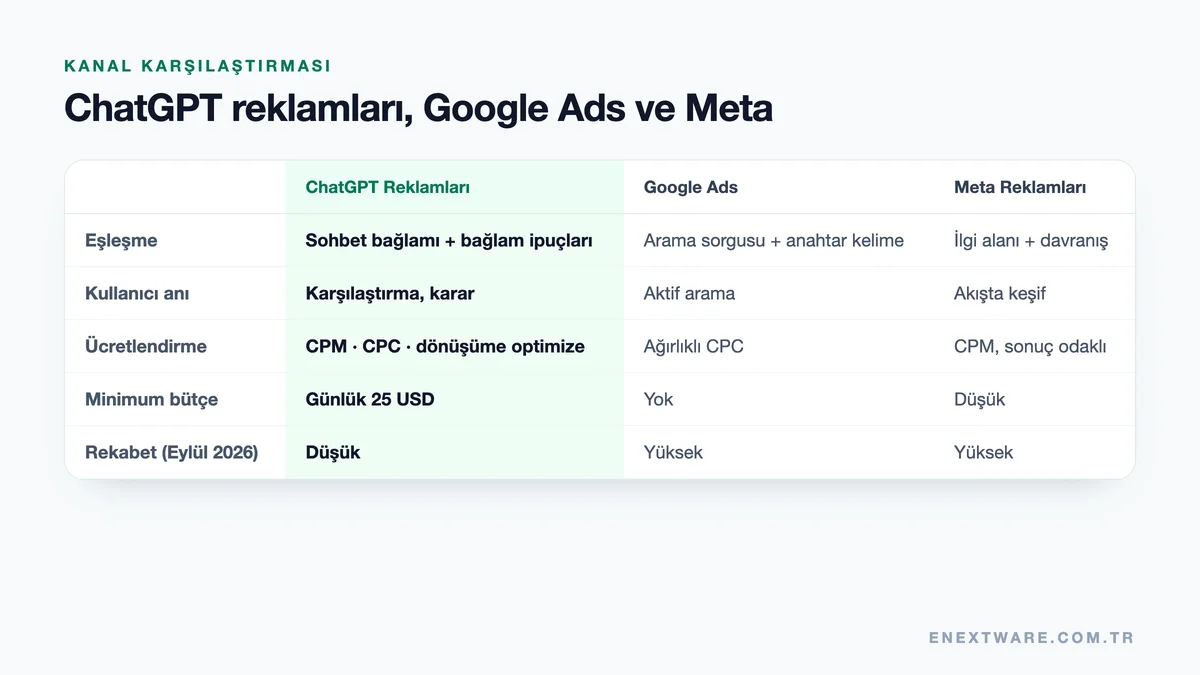
| Criterion | ChatGPT Ads | Google Ads | Meta Ads |
|---|---|---|---|
| Matching | Conversation context + context hints | Search query + keyword | Interests + behaviour |
| User moment | Comparing, consulting, deciding | Active search | Discovery in the feed |
| Pricing | CPM, CPC, conversion-optimised | Weighted CPC | CPM, results-based |
| Minimum budget | 25 USD per day on USD accounts | None | Low |
| Formats | Headline, description, image; product feed | Text, shopping, display, video | Image, video, carousel |
| Maturity | Beta, in Turkey since September 2026 | Mature ecosystem | Mature ecosystem |
| Competition | Low for now | High in most industries | High |
Google Ads should come first for: services with urgent, clear search intent (locksmiths, plumbers), high-volume price-driven products, and categories that cannot advertise on ChatGPT because of its ad policy.
ChatGPT ads are a strong candidate for: products that require comparison and research (software, electronics, furniture), consulting and professional services, tourism and hospitality, education and courses, and B2B services that need tailored solutions.
A practical budget approach: keep your existing Google Ads budget and set aside a separate 4–6 week test budget for ChatGPT, compare the cost per conversion and conversion quality of the two channels in GA4, and shift budget to the scenario that works. For the Google side of the fundamentals, see our Google Ads guide.
Prohibited and restricted categories
Under OpenAI's ad policies, some categories cannot advertise and others are subject to strict review. Account verification also assesses whether your products and services comply with these policies.
| Status | Categories |
|---|---|
| Prohibited | Gambling and betting, alcohol, tobacco and nicotine products, adult content and dating, drugs, political ads |
| Strict review | Health, finance, legal services |
| Contexts where ads are not shown | Accounts predicted to be under 18, conversations on sensitive topics, content unsuitable for brand safety |
Policies can change during the beta, so check the current OpenAI ad policies before launching a campaign.
User privacy in ChatGPT ads
OpenAI states that ads are kept separate from answers, clearly labelled, and that users can control how their data is used for ads. Advertisers cannot see a user's conversation; in Ads Manager they only see aggregate metrics. Users can manage the scope of ad personalisation in their settings. Because ad personalisation is currently unavailable in the European Economic Area and Switzerland, avoiding custom audiences in these regions is recommended.
September 16, 2026: Sponsored Agents and new tools
On September 16, 2026, OpenAI announced a set of features that make ChatGPT ads more interactive:
- Sponsored Agents (pilot, US): A user who sees the ad can start a separate, clearly labelled conversation with an agent sponsored by the brand and ask questions about product features, sizing, compatibility and so on; when ready, they move on to the brand's website. For now it is being tested with selected US advertisers.
- AI-assisted campaign creation: Preparing ads and campaigns from within ChatGPT with a few prompts, plus new creative tools in Ads Manager.
- HubSpot and Shopify integrations: The first CRM and e-commerce partners; ads connect to the tools businesses already use.
- Measurement and targeting updates: Impression-billed conversion optimisation, adjustable attribution windows and platform-level targeting.
Some of these features are still US-only or in pilot. For advertisers in Turkey, the core format for now is the sponsored card below the conversation.
8 common mistakes in ChatGPT ads
- Choosing the wrong country or currency when opening the account (it can't be changed later).
- Not noticing security settings on the landing page that block OAI-AdsBot.
- Putting all products into a single ad group and writing generic context hints.
- Going live with a single ad variation.
- Sending traffic to a generic home page.
- Spending budget without setting up conversion measurement and UTM.
- Looking at the first days' data and shutting the campaign down early; meaningful results need 2–4 weeks.
- Trying to speed up review by opening duplicate accounts or applications.
Scam warning: what to watch out for
As with every new ad channel, exaggerated promises are appearing around ChatGPT ads. Watch out for:
- The promise of a "guaranteed #1 spot in ChatGPT": Ads are shown by auction and relevance; no agency can guarantee placement. Nobody can buy a place in organic answers either.
- An account opened in the agency's name: The ad account should be opened with your company's details and your billing; the agency should be added by invitation. That way the account and data always stay with you.
- Unofficial "ChatGPT ads panel" links: Ads are managed only through ads.openai.com. Don't enter login details via links in suspicious emails that claim to be from OpenAI.
ChatGPT ads and organic visibility (GEO)
Advertising on ChatGPT does not get your brand recommended in ChatGPT's organic answers; OpenAI states that ads are kept separate from answers. Organic visibility is a separate discipline, commonly called GEO (Generative Engine Optimization). The strongest strategy is to run both together: ads deliver immediate visibility, organic work builds long-term trust. For details, see our article How does your brand become visible in ChatGPT?
Where to start?
In short, your first-week to-do list: check your industry's eligibility, open the advertiser account with the correct country and currency, open your landing page to OAI-AdsBot, complete conversion measurement and UTM setup, and launch a daily-budget test campaign with separate ad groups and multiple ad variations for your strongest 1–2 services.
If you would like to run setup, context hints and optimisation together with us, take a look at our ChatGPT ads management service.
Frequently Asked Questions
What are ChatGPT ads?
They are ads OpenAI shows below ChatGPT answers with a "Sponsored" label, matched to the context of the conversation. An ad consists of the advertiser name, logo, headline, description, image and landing page.
Does ChatGPT show ads?
Yes. On ChatGPT's Free and Go plans, sponsored ads are shown below the answer in eligible conversations. Plus, Pro and Business users don't see ads.
Can you run ChatGPT ads in Turkey?
Yes. Since September 2026, Turkey has been on OpenAI Ads Manager's self-serve availability list. Businesses established in Turkey can open an advertiser account at ads.openai.com.
What is the first step to advertising on ChatGPT?
Check that your industry complies with the ad policies, then open an advertiser account at ads.openai.com in your business's name, with the correct country and currency.
Is there keyword targeting in ChatGPT ads?
Not in the classic sense. Context hints written at ad group level describe in which conversations the ad is relevant, but they don't provide exact matching or guaranteed impressions.
What is the minimum budget for ChatGPT ads?
For accounts billed in USD, the minimum daily budget is 25 USD. The daily budget works as a seven-day average.
Are ChatGPT ads expensive?
The price is set by auction; OpenAI recommends starting with a maximum bid of 3–5 USD per click. Because the channel is new in Turkey and competition is low in most industries, now is a favourable time to test it.
Do ads affect the answer ChatGPT gives?
According to OpenAI, no. Ads are kept separate from answers and clearly labelled.
Are my ChatGPT conversations shared with advertisers?
No. Advertisers do not see user conversations; they only see aggregate metrics such as impressions, clicks, spend and conversions.
How long does ChatGPT ad account approval take?
It varies because applications are reviewed in order, and it can take a few days. OpenAI states that it cannot expedite account and ad reviews.
Why isn't my ad running?
The most common reasons are incomplete verification or billing, campaign dates that don't include today, an ad that hasn't passed review yet, and a landing page OAI-AdsBot cannot access.
Can an agency manage my ChatGPT ad account?
Yes. The account is opened in your business's name, and the agency is invited via Settings > Users to manage campaigns.
Will ChatGPT ads replace Google Ads?
Not in the short term. The two channels address different user moments; for most businesses the right approach is to use both together, guided by measurement.
Should I trust people promising a "guaranteed #1 spot in ChatGPT"?
No. Ads are shown by auction and relevance, and a place in organic answers can't be bought. A guarantee is a warning sign.
Can I turn off ChatGPT ads as a user?
For an ad-free experience, the Plus, Pro or Business plans can be used. On the free plan, the scope of ad personalisation can be controlled in settings.
Sources
- OpenAI Ads (Turkish)
- Ads in ChatGPT: The Basics — OpenAI Help Center
- Ads Manager Availability — OpenAI Help Center
- Quickstart: Launch your first campaign — OpenAI Help Center
- Ads Manager Beta Account Setup — OpenAI Help Center
- Create Campaigns for ChatGPT Ads — OpenAI Help Center
- Create Ad Groups for ChatGPT Ads — OpenAI Help Center
- Create Ads for ChatGPT Ads — OpenAI Help Center
- Advertiser Guidance for Allowing OpenAI Web Crawlers — OpenAI Help Center
- Reimagining advertising with AI — OpenAI
- OpenAI Ad Policies